

(Updated November 2026)
Mistake-proofing, or poka-yoke, means designing a product or process so the wrong assembly is impossible, or so an error is caught the moment it happens. In electronics, that can be as small as a pin on an enclosure or a connector that only fits one way.
Below are 10 methods, with real examples from Titoma projects and classic examples from manufacturing.
Mistake-Proofing Key Takeaways
- Without mistake-proofing, assembly errors turn into product returns.
- The cheapest place to mistake-proof is the design stage. Fixing it on the production line takes more time and money.
- A clear SOP (standard operating procedure) is the base. Poka-yoke makes the SOP hard to break.
- Assume anything that can be assembled wrong will be. Design so it can’t.
Electronics manufacturing ties up a lot of cash. Let quality slip and you end up paying for rework, returns and lost time.
We asked our network what the No. 1 mistake is that they’ve seen hardware start-ups make. Here are the results.

That’s why every stage of product development needs a plan to prevent errors without adding cost. This is what mistake-proofing, or poka-yoke, is for.
What Is Poka-Yoke?
Poka-yoke is Japanese for “mistake-proofing.” The idea came from Shigeo Shingo at Toyota in the 1960s. Instead of asking people to be more careful, you change the part, the tool or the process so the mistake can’t happen, or so it’s caught right away.
There are three common types of poka-yoke:
- Contact method: the shape or size of a part makes the wrong fit impossible. Example: a keyed connector.
- Fixed-value method: checks that the right number of actions happened. Example: a screwdriver that counts screws.
- Motion-step method: checks that steps happen in the right order. Example: a test station that won’t start until the firmware version is confirmed.
Mistake-proofing and error-proofing mean the same thing. Poka-yoke is the original term.
1. Mistake-Proofing by Design
We use poka-yoke at the design stage, so the device can only be assembled one way. Here are two examples from client projects. You can see more of the products we have built.
Example: a locating pin on an enclosure
Look at this enclosure we designed for a client. We added one very small feature for one reason only: to prevent assembly errors.
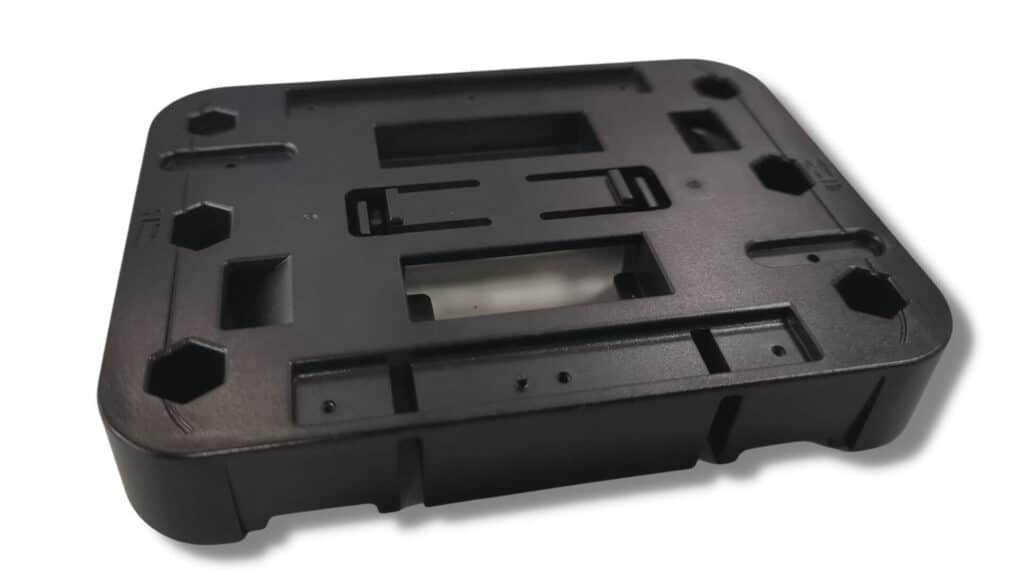
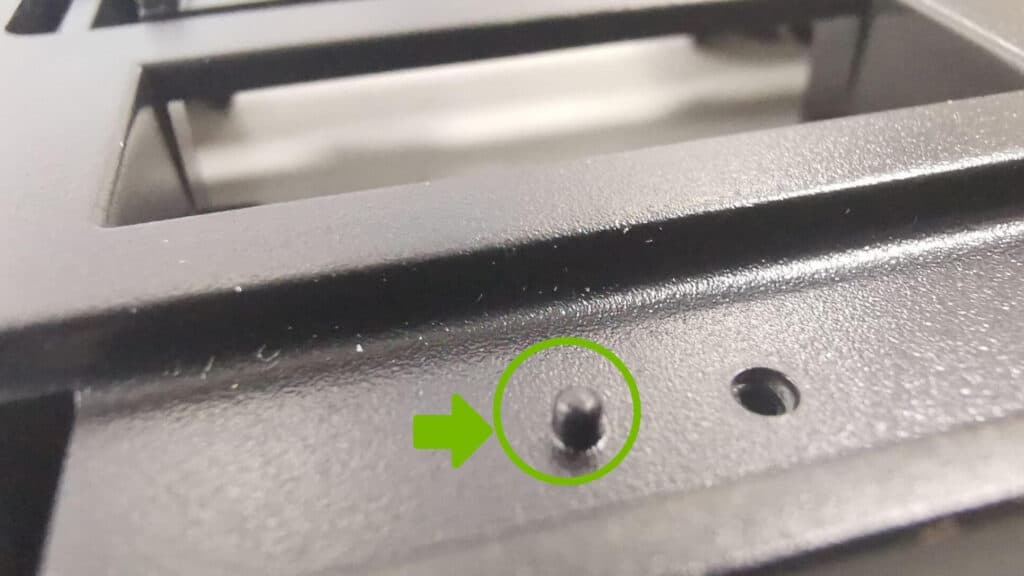
The small pin in the green circle makes it impossible to assemble the product the wrong way. Even a new operator will know right away if it’s right or not.
The operator has to put these two brackets on top of the enclosure.

The result should look like this:
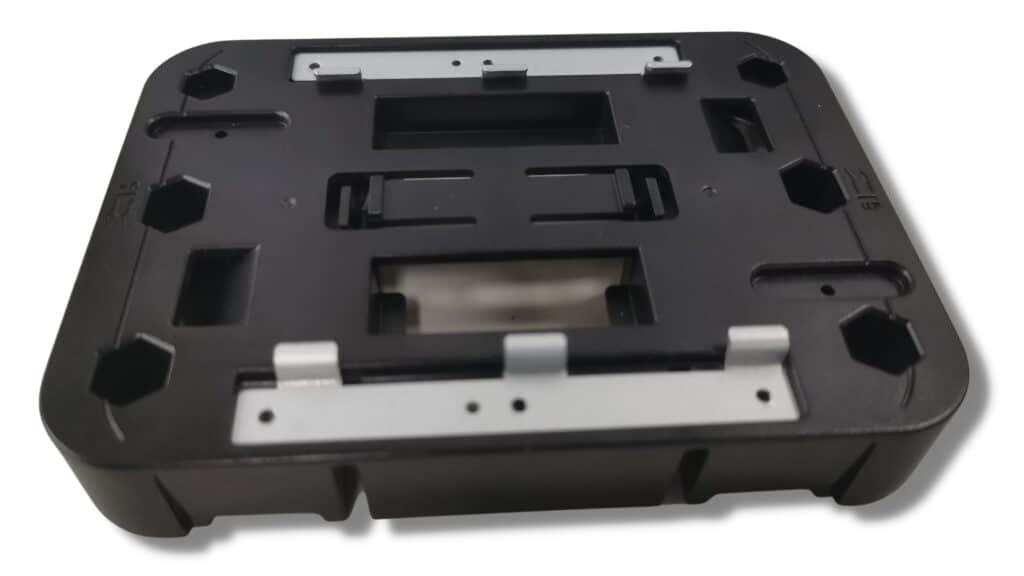
How hard can it be? The two brackets look the same, but they’re not. Bracket 1 goes at the top (in this picture) and bracket 2 at the bottom.
The pin makes it impossible to swap them. Put bracket 1 at the bottom and it sits uneven and doesn’t feel right. The operator knows immediately it’s the wrong part and corrects it.
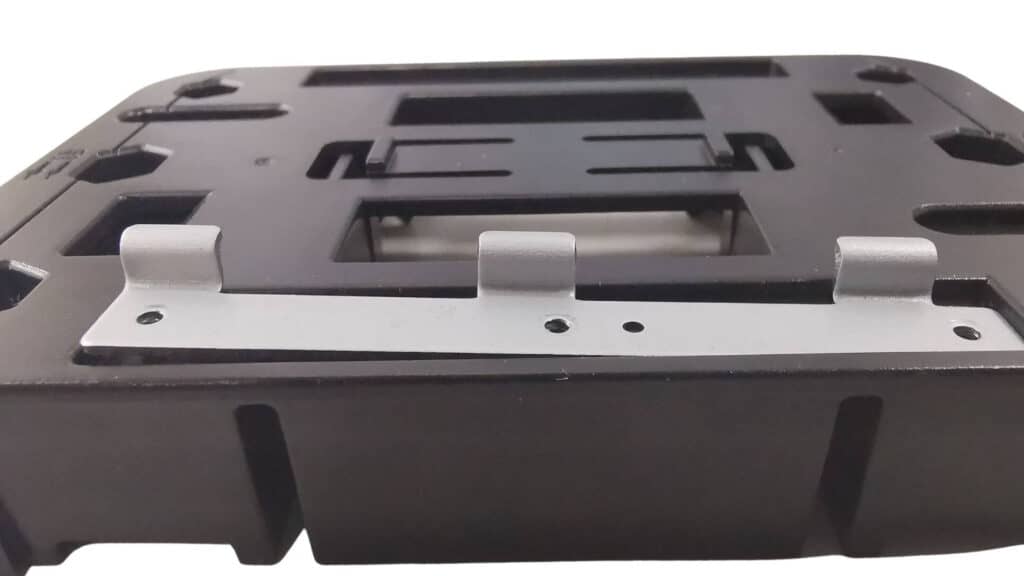
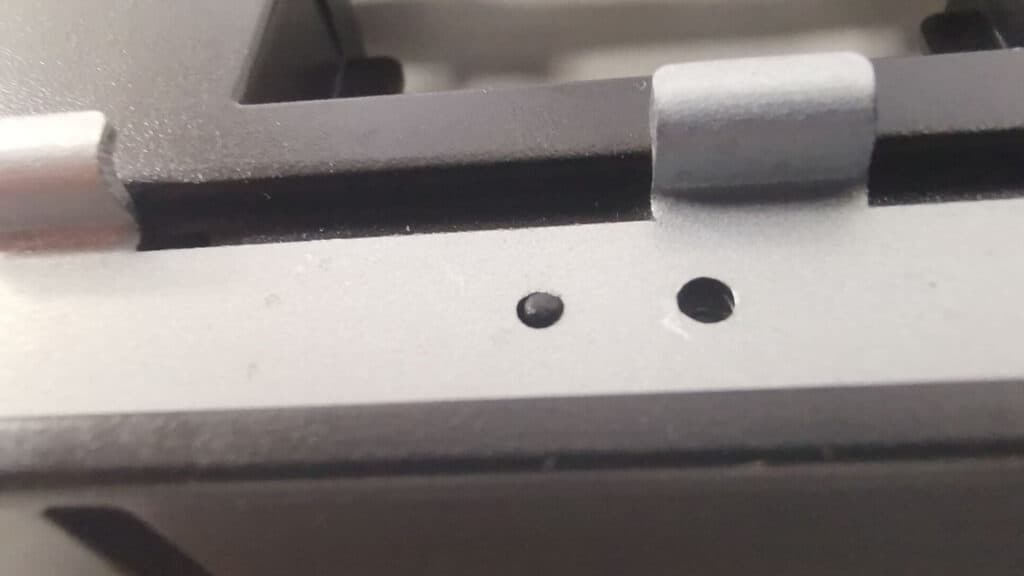
This principle can be applied to every part and component of your electronics.

Example: a cable that can’t be connected the wrong way
These two cables look the same at first, but they’re not.
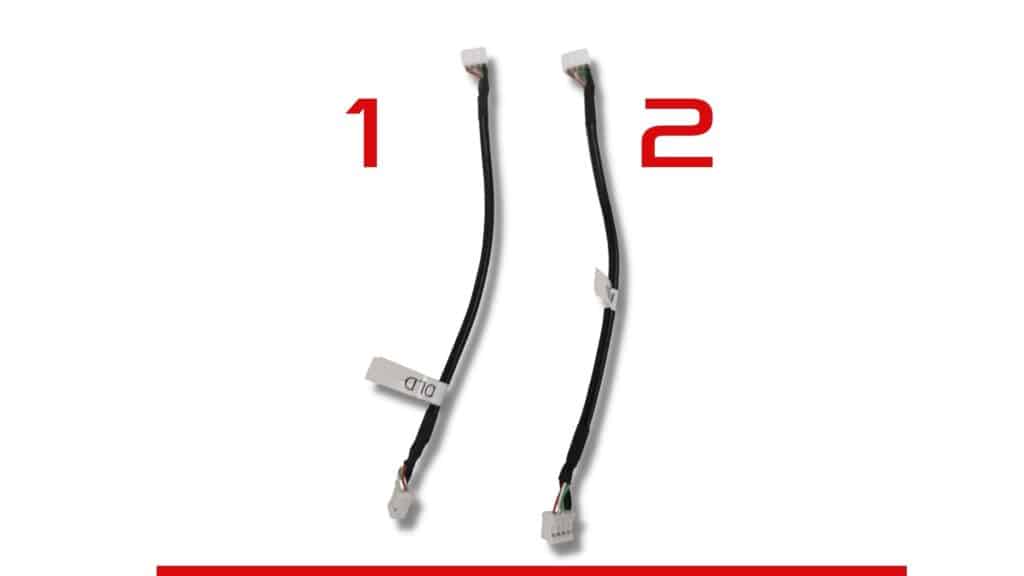
When you connect them to the USB board, the ground wire is on the right side, which is where we need it.

Now use the other end of each cable. On cable 1, the ground ends up on the left. That’s a problem.

So how do you make sure operators always use the right end of cable 1? You don’t. We redesigned cable 1 so the ground is on the right no matter which end is used. Now operators can’t get it wrong.
Already heading to mass production without mistake-proofing in the design? There are still techniques you can add on the line, mainly against human error. They work, but they take time and money to set up. That’s why we recommend starting at the design stage.
Human Error in the Manufacturing Process
- Placing a part in the wrong orientation
- Inserting the wrong component
- Using the wrong screws or fasteners
- Skipping steps

These are just a few of the errors that happen in mass production. Repeated across thousands of units, they become a quality problem for the whole run.
Imagine a high return rate on your first production run, just when you’re trying to recover your NRE costs. That can sink a hardware company.
Poka-Yoke Examples Specific to Electronics
Most poka-yoke guides use car or furniture examples. These are the ones that matter for PCBs and electronic products:
- Keyed and polarized connectors. Use connectors that only fit one way, and use a different connector type or pin count for cables that sit next to each other.
- Asymmetric footprints and mounting holes. Design PCB footprints and mounting holes so a board or part can’t be rotated 180° and still fit.
- Clear polarity marks. Silkscreen polarity for diodes, LEDs, electrolytic capacitors and pin 1 on ICs, visible after placement.
- SPI and AOI inspection. Solder paste inspection and automated optical inspection catch missing, shifted or reversed parts before they move on. See AOI vs SPI.
- Firmware and test checks. The test station confirms the board ID and firmware version before running a functional test, so the wrong firmware can’t ship.
- Barcode traceability. Every reel and every board gets scanned, so a wrong part is flagged at the station, not at the customer.
- Torque-controlled screwdrivers. They count screws and stop at the right torque, so nothing is left loose or stripped.
- Jigs and fixtures. Test and assembly fixtures that only accept the board in the correct orientation.
2. Barcode or RFID System to Prevent Use of Wrong Parts
Errors happen most when a product has several variants that use look-alike parts. Think of two phone models whose camera modules look almost the same, or control modules that look identical but run different firmware.
A barcode or RFID check solves this. The scanner verifies each part against the correct part number before it’s installed.

3. Visual Controls and Instructions Based on the Operator’s Expertise
When you assemble IKEA furniture, you follow a manual. Assembly lines work the same way: clear instructions prevent defects.
Paper manuals help, but a screen works better. A wall-mounted screen or rugged tablet can show each step, highlight the critical parts, and remind the operator of the most common mistakes for that step.
You Can Set Up Messages and Warnings
- Don’t mix up these wire harnesses
- These are the approved substitute parts
- Check this part for defects
- This is the correct part, quantity and orientation for this step

You can also show a video of how to self-inspect. This is one of the most effective tools, especially for new operators.
4. Applying Mistake-Proofing Through Operator Control
Accountability helps too. When every step is traced to an operator, people take more care.
On bigger lines, a login system can make sure only operators certified for a station can work there.

5. Tool Interlock for Mistake-Proofing
Almost every electronic device has screws and fasteners. Using the right tool for each one keeps products from falling apart in the customer’s hands.
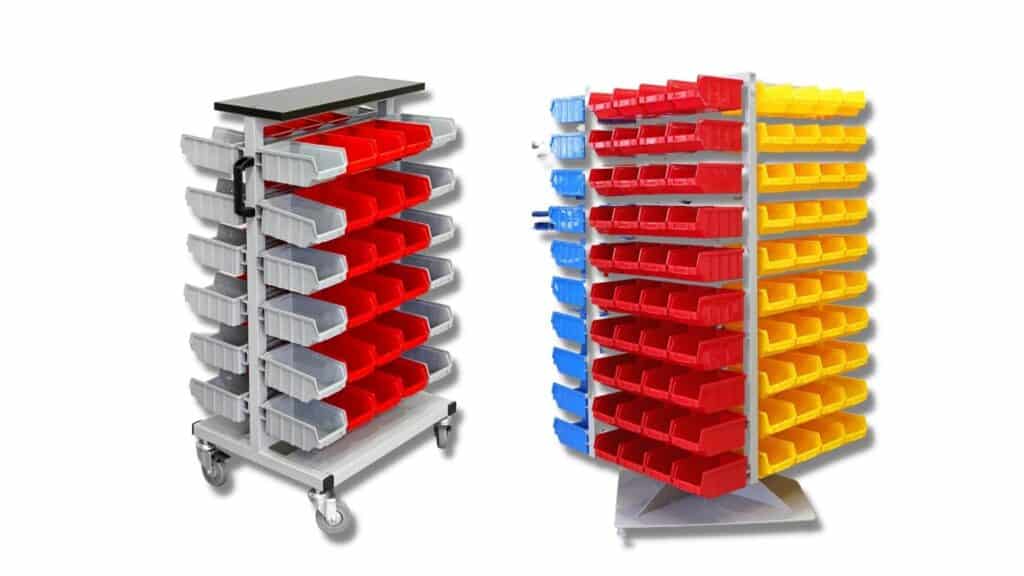
Give each station only the tools and parts it needs. Fewer options means fewer ways to get it wrong.
The Six Mistake-Proofing Principles
Methods 6 to 10 below follow the six classic mistake-proofing principles: elimination, replacement, prevention, facilitation, detection and mitigation. Elimination by design is our favorite, because it removes the error instead of catching it.
Principle 1: Elimination by Design
Design the part so it can’t be assembled wrong, like the bracket pin and the cable above. This is the most reliable way to remove an error.
Poka-Yoke Example 1

Process: A shaft is pressed into a hole in a control arm.
Before: Both ends of the shaft had the same diameter, so shafts were often pressed in backwards.
After: The hole and one end of the shaft were made smaller, so only the correct end fits.
Poka-Yoke Example 2

Process: Variable capacitors with potentiometers are mounted on circuit boards. The terminal on top must not touch other parts.
Before: Plastic tubing was glued over the terminal, but pushing it on sometimes broke the terminal.
After: A new way of insulating the terminal removed the tubing step and the defects it caused.
Illustration source: Poka-Yoke: Improving Product Quality by Preventing Defects, NKS/Factory Magazine
6. Mistake-Proofing by Replacement
Replace error-prone manual steps with automated ones. For example, use an automatic dispenser for the exact amount of adhesive, or pick-and-place machines instead of hand placement. Color-coding similar parts is a simple version of the same idea.
7. Mistake-Proofing by Prevention
Use limit switches, sensors or vision systems that stop a faulty product from moving to the next step.
Poka-Yoke Example 3

Process: A series of holes is drilled in a plate.
Before: The operator judged the depth, and the drill was sometimes pulled out too early.
After: Two limit switches were added. If switch 1 releases before switch 2 is reached, a buzzer warns the operator.
8. Mistake-Proofing by Facilitation
Make the right way the easy way: video instructions at the station, marks that guide the operator to the correct orientation, and fewer separate steps.
9. Mistake-Proofing by Detection
Catch the error right after it happens, before the product moves on. In electronics this is SPI, AOI, in-circuit testing and functional testing. Read more in PCB testing methods and how IQC, IPQC and OQC fit together.
Poka-Yoke Example 4

Process: Two similar parts come out of one mold and are sorted by hand.
Before: Parts were sometimes mixed up, and customers received the wrong ones.
After: A light sensor was added to the jig. If light passes through, it’s part A. If not, it’s part B.
Illustration source: Poka-Yoke: Improving Product Quality by Preventing Defects, NKS/Factory Magazine
10. Mistake-Proofing by Mitigation
When an error can’t be fully prevented, reduce its impact. Design for easy, low-cost rework, add design margin, or add redundancy so one error doesn’t cause a failure in the field.
Summary: 10 Mistake-Proofing Methods
| # | Method | Electronics example | Stage |
|---|---|---|---|
| 1 | By design | Keyed connector, locating pin, symmetric cable | Design |
| 2 | Barcode / RFID | Scan reels and modules against the BOM | Assembly |
| 3 | Visual instructions | On-screen steps with warnings | Assembly |
| 4 | Operator control | Station login for certified operators | Assembly |
| 5 | Tool interlock | Torque-controlled screwdrivers, station-specific tools | Assembly |
| 6 | Replacement | Pick-and-place, automatic dispensing | Assembly |
| 7 | Prevention | Sensors that block the next step | Assembly |
| 8 | Facilitation | Polarity marks, guide marks, fewer steps | Design / assembly |
| 9 | Detection | SPI, AOI, ICT, functional test | Test |
| 10 | Mitigation | Easy rework, design margin | Design |
Frequently Asked Questions
What is poka-yoke in simple terms?
It’s a way of designing parts or processes so mistakes can’t happen, or are caught immediately. A SIM card with a cut corner that only fits one way is a poka-yoke.
Is mistake-proofing the same as error-proofing?
Yes. Mistake-proofing, error-proofing and poka-yoke all describe the same idea.
What are the three types of poka-yoke?
Contact (shape or size prevents the wrong fit), fixed-value (checks the right number of actions) and motion-step (checks steps happen in the right order).
What is an example of poka-yoke in electronics?
A keyed connector that only plugs in one way, a PCB footprint that can’t be placed rotated, or a test station that checks the firmware version before testing.
When should mistake-proofing start?
At the design stage. A pin or a keyed connector costs almost nothing in the design, while fixing errors in mass production costs far more. Read more in our DFM guide.
Designing a new electronic product? We build mistake-proofing into the design so your first production run goes right. Talk to our engineers.